
Casing Design
The list of casing items used for drilling can be added on the Casing Design tab.
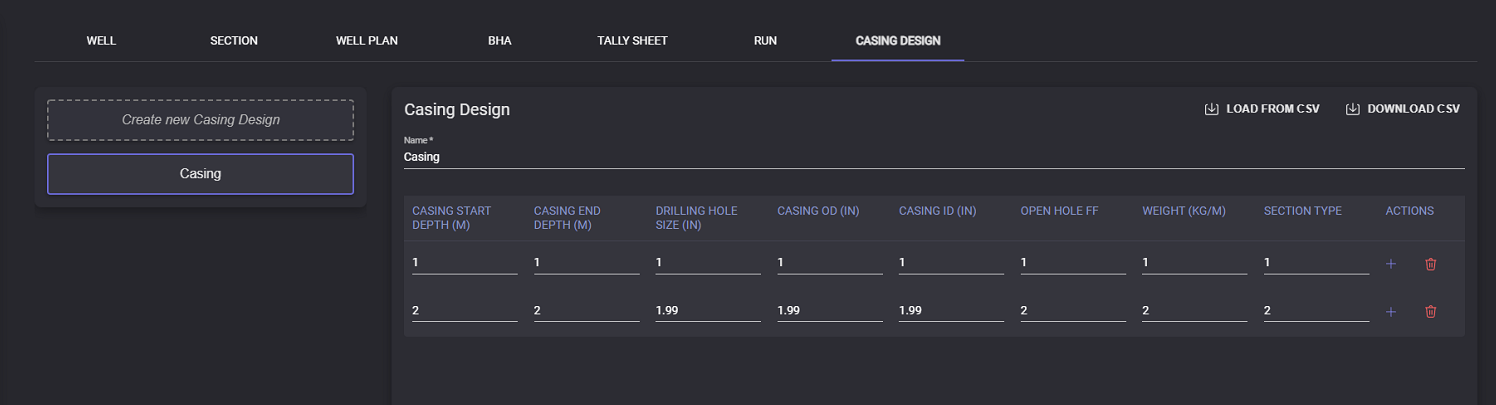
To add new Casing click on the Create new Casing Design button on the left panel. Enter the name of the casing. In the table can be added values for the casing:
Casing start depth (m)
Casing end depth (m)
Drilling hole size (in)
Casing OD (in)
Casing ID (in)
Open hole FF
Weight (kg/m)
Section type
To add the new row below click on the “+“ button in the Actions column. To delete row from the table click on the “recycle bin“ button in the Actions column.
Click on Save button to finish creating of the casing or apply changes to the casing design.
Casing design information can be exported in .csv file. Click on the Download CSV button. In the opened modal window specify the local folder to export the file. The file will be saved in the selected folder.
Casing design information can be filled in by importing the .csv file. To import data click on the Load from CSV button. In the Open file window select the file containing corresponding data and click Open. All the data from the .csv file will be imported to the corresponding fields on Casing design page.